


If you are into running local LLM models you have came across llama.cpp – basically your best friend in optimizing a model to run locally on your pc.
How llama.cpp helps us ?
The main goal of llama.cpp is to enable LLM inference with minimal setup and state-of-the-art performance on a wide range of hardware – locally and in the cloud.
Some of the benefits, the ones I could say I am able to explain :)
- LLM inference – model being asked and generating a token.
- AVX, AVX2, AVX512 and AMX support for x86 architectures – this is like additional power for your CPU. Think about it as a way to actually handle multiple numbers at once vs a single number, when we are doing computations. In our case we have avx2.
- 1.5-bit, 2-bit, 3-bit, 4-bit, 5-bit, 6-bit, and 8-bit integer quantization for faster inference and reduced memory use – we are going to reduce the precision of the model a little bit, so that we could run it locally.
- llama-server – A lightweight, OpenAI API compatible, HTTP server for serving LLMs.
This whole flow was done on Windows 11 machine with 32 GB RAM, no GPU. The hosting layer is actually WSL.
Download llama.cpp
git clone https://github.com/ggerganov/llama.cpp.gitcd llama.cppgit submodule update --init --recursiveCloning into 'llama.cpp'...remote: Enumerating objects: 76076, done.remote: Counting objects: 100% (140/140), done.remote: Compressing objects: 100% (109/109), done.remote: Total 76076 (delta 66), reused 31 (delta 31), pack-reused 75936 (from 3)Receiving objects: 100% (76076/76076), 279.84 MiB | 4.48 MiB/s, done.Resolving deltas: 100% (55199/55199), done.
Build it. Had to also install cmake.
~/llama.cpp$ cmake -B build-- The C compiler identification is GNU 13.3.0-- The CXX compiler identification is GNU 13.3.0-- Detecting C compiler ABI info-- Detecting C compiler ABI info - done...-- Generating embedded license file for target: common-- Configuring done (4.4s)-- Generating done (0.1s)-- Build files have been written to: /home/goshko/llama.cpp/build
cmake --build build --config Release[ 0%] Building C object ggml/src/CMakeFiles/ggml-base.dir/ggml.c.o[ 1%] Building CXX object ggml/src/CMakeFiles/ggml-base.dir/ggml.cpp.o[ 1%] Building C object ggml/src/CMakeFiles/ggml-base.dir/ggml-alloc.c.o[ 1%] Building CXX object ggml/src/CMakeFiles/ggml-base.dir/ggml-backend.cpp.o[ 1%] Building CXX object ggml/src/CMakeFiles/ggml-base.dir/ggml-opt.cpp.o[ 2%] Building CXX object ggml/src/CMakeFiles/ggml-base.dir/ggml-threading.cpp.o[ 2%] Building C object ggml/src/CMakeFiles/ggml-base.dir/ggml-quants.c.o[ 2%] Building CXX object ggml/src/CMakeFiles/ggml-base.dir/gguf.cpp.o[ 2%] Linking CXX shared library ../../bin/libggml-base.so[ 2%] Built target ggml-base...[100%] Building CXX object tools/fit-params/CMakeFiles/llama-fit-params.dir/fit-params.cpp.o[100%] Linking CXX executable ../../bin/llama-fit-params[100%] Built target llama-fit-params
Verify the build tree layout is as expected.
~/llama.cpp$ tree build -L 1build├── CMakeCache.txt...├── Testing├── bin
An important note!
When llama.cpp is looking for LLM model to run just remember that the model needs to be in GGUF format. You could also convert it to GGUF, but this guide would not cover that. Just think about GGUF as the only format llama.cpp understands and requires.
Text after the important note
In order for us to get GGUF model and search for others we would go to the hugging-face library. Imagine hugging-face as a docker repository for LLMs.
We also have to know that although our RAM does not look that tiny the biggest model we could run locally at the moment is around 8 billion parameters.
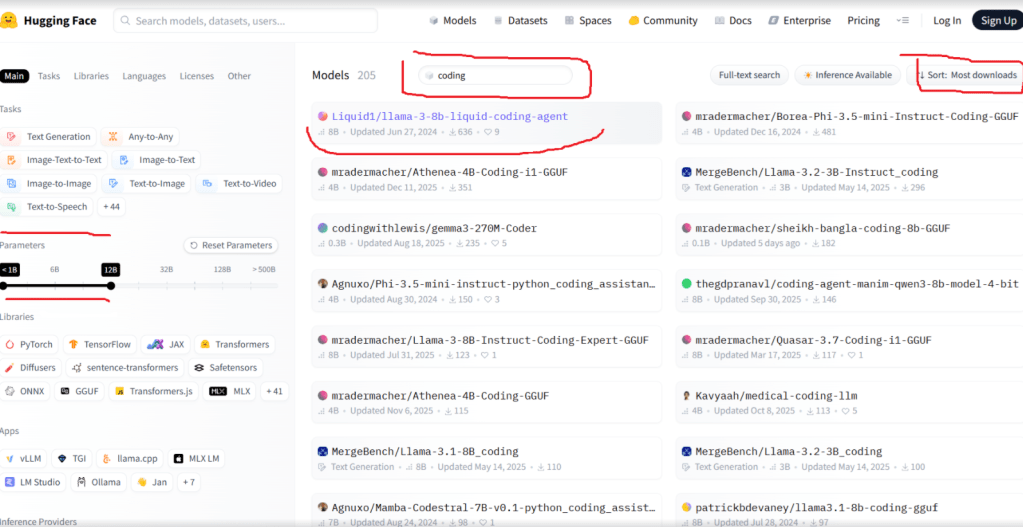
We have liked the Liquid1/llama-3-8b-liquid-coding-agent.
Let’s install the hugging-face cli to download it.
curl -LsSf https://hf.co/cli/install.sh | bash
Let’s download the model using the hugging-face cli. Again this might take some time and storage.
hf download Liquid1/llama-3-8b-liquid-coding-agent --include "*.gguf"Downloading (incomplete total...): 0%| Downloading (incomplete total...): 9%|███
~/llama.cpp$ hf cache lsID SIZE LAST_ACCESSED LAST_MODIFIED REFS-------------------------------------------- -------- -------------- ------------- ----model/Liquid1/llama-3-8b-liquid-coding-agent 21.0G 12 minutes ago 7 minutes ago mainFound 1 repo(s) for a total of 1 revision(s) and 21.0G on disk.
Let’s clap ourselves on the back we just downloaded a local 21 GB LLM, not bad.
We need to know the hugging face home directory in order to refer to the model, when we are launching it.
~/llama.cpp$ echo ${HF_HOME:-$HOME/.cache/huggingface}/home/goshko/.cache/huggingface~/llama.cpp$ tree /home/goshko/.cache/huggingface/home/goshko/.cache/huggingface├── hub│ └── models--Liquid1--llama-3-8b-liquid-coding-agent│ ├── blobs│ │ ├── 1fe6d072926bed...│ │ └── cf0e7bf7eabf1e...│ ├── refs│ │ └── main│ └── snapshots│ └── 550ce137739fea5887f95e3cff826a2c450cd7c8│ ├── llama-3-8b-liquid-coding-agent.F16.gguf -> ../../blobs/1fe6d072926bed...│ └── llama-3-8b-liquid-coding-agent.Q4_K_M.gguf -> ../../blobs/cf0e7bf7eabf1e...└── xet ├── https___cas_serv-tGqkUaZf_CBPHQ6h │ └── staging └── logs └── xet_20260115T094752148+0200_210885.log11 directories, 6 files
Let’s run it with llama.cpp server. It’s a long and explicit command. You would have to provide –mmap, otherwise ( unless you are enough RAM heavy ) the model loading will be killed at one point by the OS.
/build/bin/llama-server \-m ~/.cache/huggingface/hub/models--Liquid1--llama-3-8b-liquid-coding-agent/snapshots/550ce137739fea5887f95e3cff826a2c450cd7c8/llama-3-8b-liquid-coding-agent.F16.gguf \--mmap
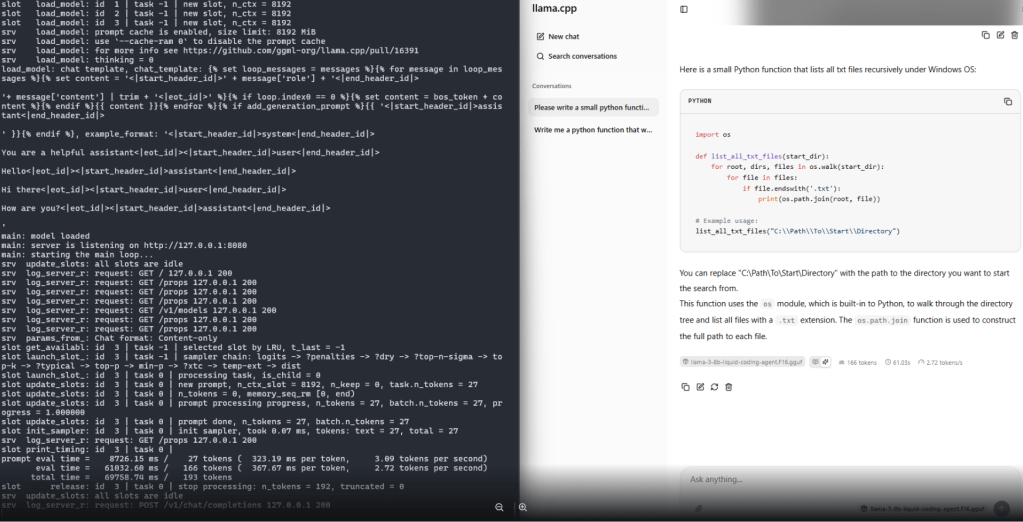
I would skip the output from the cli and provide the final result, which is generating text at almost 3 tokens per second. Not great for sure, not bad for a local model that you could run when the big guys are temporary out of business due to DNS global issues, costs nothing essentially and you could isolate the problem.


Leave a comment