


For a long time the standard way to expose a service outside of Kubernetes has been to create an Ingress object. For a long time the standard way this object to be created in the majority of cloud vendors offering a managed k8s service was Ingress NGINX Controller.
Those times are coming to and end.
The Gateway API was developed to tackle some of the hacks and limitations in those Ingress objects and to be more role oriented towards who’s who in the landscape of developers and cluster operators.
At the same time to push this ‘new thing’ into more usability the Ingress NGINX controller is supported until the end of March 2026.
This article will highlight one of the good approaches if you are running you cluster under Azure environment. It does not provide exact implementation steps, but more like a high level general approach.
Before getting into this high level approach you have to first understand that there are a few differences when you are implementing Gateway API vs Ingress.
If you visit the official documentation for the API Gateway https://kubernetes.io/docs/concepts/services-networking/gateway/ you could see the flow of a standard http request.
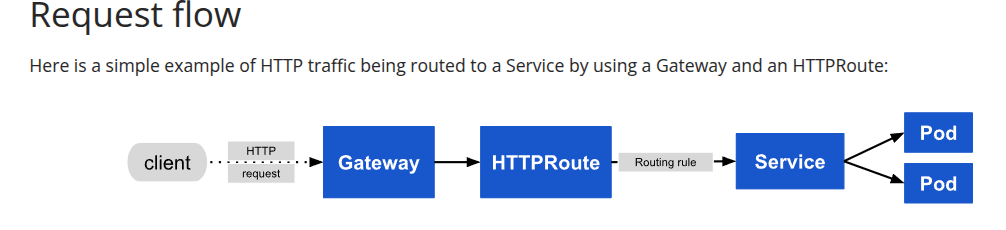
For the most part the HTTPRoute is mapped to an Ingress object so you would need a way to ‘convert’ you current Ingress to Gateway. More or less this could be handled by a tool like https://github.com/kubernetes-sigs/ingress2gateway or an LLM.
The Gateway is acting like a load balancer and each HTPPRoute is binded to one Gateway. You could have multiple Gateways in a cluster, for example one Private for protected VPN access and one public.
If you are doing this migration inside Azure I would suggest to utilize the Application Gateway for Containers. It’s a managed service by Azure, there are security rules that you could apply and also you get the benefit of running KQL queries over each interaction in the above diagram workflow.
https://learn.microsoft.com/en-us/azure/application-gateway/for-containers/overview
The AGC(Application Gateway for Containers) is a separate service from you cluster and acts as a frontend to each connection. From there on there is a dedicated proxy subnet that will pass you traffic to the cluster.
On the top of that there is also ALB controller sitting in the cluster that listens Gateway API objects updates and reflects those into ARM(Azure Resource Manager) to change the appropriate AGC resources.
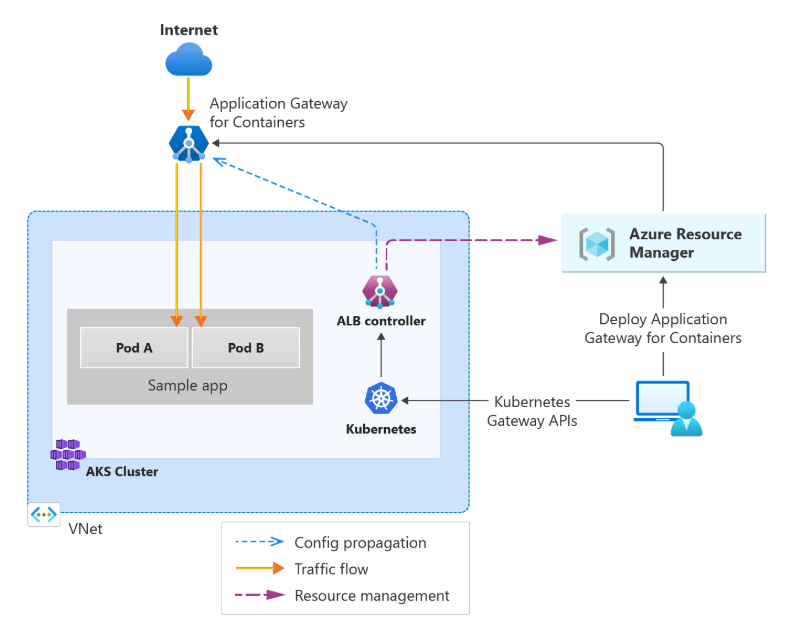
The process that we have followed is to use the bring your own deployment. The reason for this is that in our work setup there are stages that run and the first stage is Terraform. As you all know Terraform has outputs that could be further pass into each pipeline step/stage and any other custom logic tool could input them and act accordingly.
Also in the beginning it seems a little bit overwhelming solution with a lot of components, but once it’s implemented it’s rock solid managed service with a lot of flexibility.
 srejournals
Leave a comment